Design Instagram
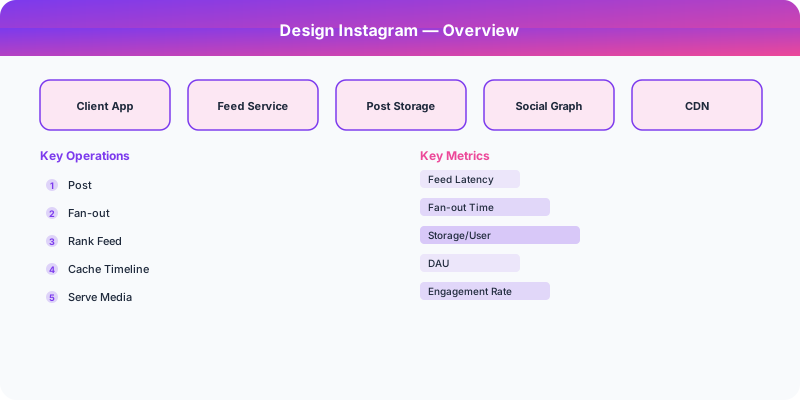
Design Instagram with photo upload pipeline, fan-out news feed, stories, and explore page. Covers image processing, CDN delivery, and feed ranking.
Problem Statement
Design a photo-sharing social network like Instagram. Users upload photos, follow other users, see a personalized feed of posts from people they follow, share temporary stories that expire in 24 hours, and discover content via an Explore page. The system handles 2B+ monthly users with 100M+ photos uploaded daily.
Requirements
Functional
- Upload photos with captions, filters, and location tags
- Generate a personalized feed ranked by relevance from followed accounts
- Stories: ephemeral posts that auto-delete after 24 hours
- Explore page: surface trending and personalized content from non-followed accounts
Non-Functional
- Latency: Feed loads in <500ms, photo upload confirmation in <3 seconds
- Availability: 99.99% for feed reads, eventual consistency acceptable (1-2 second delay for new posts)
- Scale: 2B monthly users, 500M DAU, 100M photos/day, 1M likes/second
Core Architecture
-
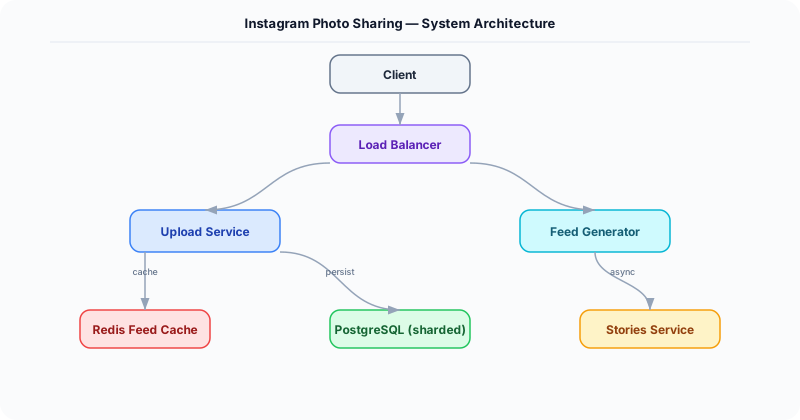
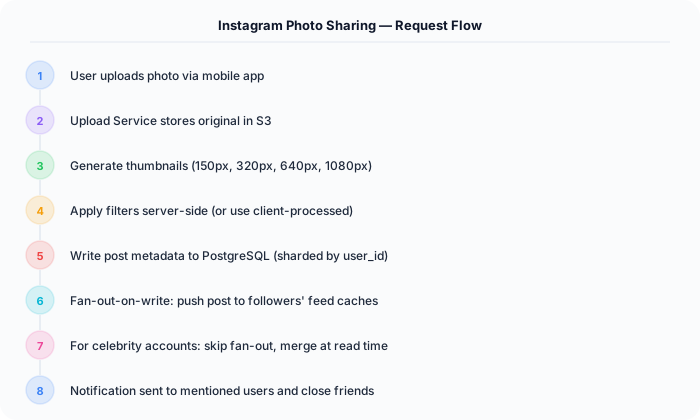
Photo Upload Pipeline -- Client uploads image to a pre-signed S3 URL. An async worker (triggered via SQS) generates multiple resolutions (thumbnail 150px, medium 640px, full 1080px), applies filters server-side if requested, strips EXIF data, and stores all variants in S3 with CDN distribution.
-
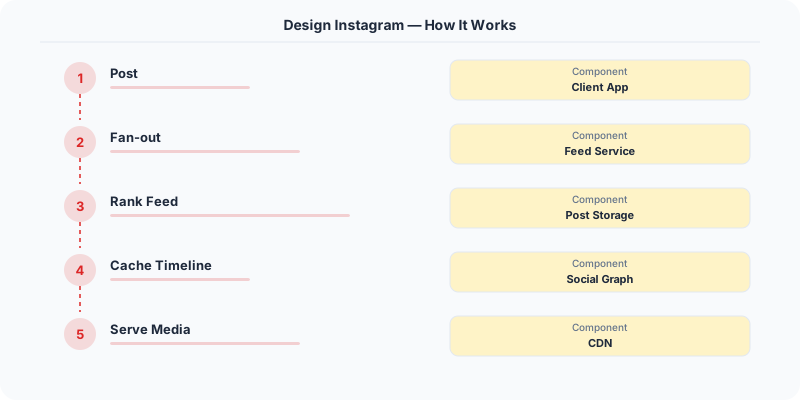
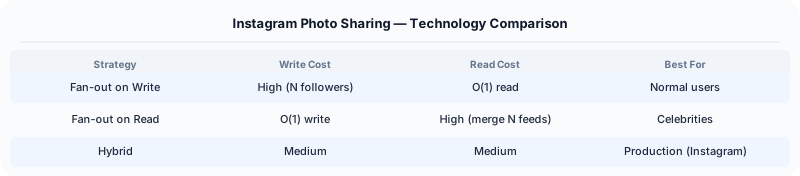
Feed Generation Service -- Hybrid push/pull model. For users with <500 followers (99% of users), new posts are fan-out-on-write: pushed to each follower's precomputed feed in Redis. For celebrity accounts (>500K followers), feed is fan-out-on-read: the follower's feed is assembled at read time by merging their precomputed feed with recent celebrity posts.
-
Stories Service -- Stories are stored with a TTL of 24 hours in a dedicated Cassandra table partitioned by user_id. A separate ring buffer per user holds story IDs. The stories tray (top of the feed) is precomputed for each user, ordered by recency and engagement probability.
-
Explore/Discovery Engine -- Kafka streams feed engagement events (likes, saves, shares) into a real-time trending detection pipeline. An embedding-based model matches user interests to content, combining collaborative filtering with image understanding (ResNet features). Candidate generation produces 10K posts, then a ranking model selects the top 50.
Database Choice
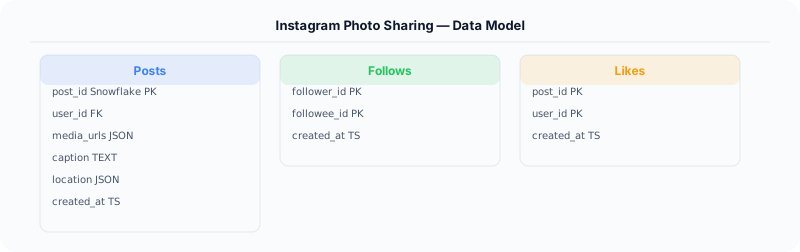
PostgreSQL for users, relationships (follows), and post metadata -- strong relational queries for follower graphs. Cassandra for the feed timeline and stories -- write-heavy, time-sorted, partitioned by user_id. S3 + CloudFront CDN for photo storage and delivery. Redis for precomputed feeds (sorted sets by timestamp) and user session cache. Elasticsearch for hashtag and user search.
Key API Endpoints
POST /api/v1/posts
  -> Body (multipart): \{ image: <file>, caption: "Sunset", location: "Bali", tags: ["travel"] \}
  -> Returns: \{ post_id: "P-456", image_urls: \{ thumb: "...", full: "..." \} \}

GET /api/v1/feed?cursor=\{timestamp\}&limit=20
  -> Returns: \{ posts: [...], next_cursor: "..." \}

GET /api/v1/stories/tray
  -> Returns: \{ trays: [\{ user_id: "U1", stories: [\{ id: "S1", media_url: "...", expires_at: "..." \}] \}] \}
Scaling Insight
The hybrid fan-out model is essential. Pure fan-out-on-write breaks for celebrities -- a single post by someone with 100M followers would generate 100M Redis writes. Pure fan-out-on-read is too slow for normal users. The hybrid approach: fan-out-on-write for 99% of users (fast reads, manageable writes), fan-out-on-read only for the top 0.1% celebrity accounts (merged at read time from a small set of celebrity timelines).
Key Tradeoffs
| Decision | Option A | Option B | Chosen |
|---|---|---|---|
| Feed model | Fan-out-on-write (push) | Fan-out-on-read (pull) | Hybrid -- push for normal users, pull for celebrities |
| Image storage | Store original only, resize on-the-fly | Pre-generate all sizes | Pre-generate -- amortizes CPU cost, CDN-friendly, predictable latency |
| Feed ranking | Chronological | ML-ranked by engagement | ML-ranked -- higher engagement, but offer chronological toggle for transparency |
Practical Implementation for .NET Developers
In a .NET application, you would typically implement this pattern using the following approach:
ASP.NET Core setup: Create a service class that encapsulates the logic, register it with dependency injection, and inject it into your controllers or minimal API endpoints. The built-in DI container handles lifecycle management.
Entity Framework Core: For database interactions, EF Core provides the ORM layer. Use migrations for schema management and raw SQL for performance-critical queries. Consider Dapper for read-heavy paths where EF Core's overhead matters.
Azure integration: If deploying to Azure, leverage managed services — Azure Cache for Redis, Azure SQL, Azure Service Bus, Azure Cosmos DB. These eliminate operational overhead and provide built-in monitoring through Application Insights.
Testing: Use xUnit with Testcontainers for integration tests that spin up real databases in Docker. Mock external dependencies with NSubstitute. The WebApplicationFactory class lets you test your entire HTTP pipeline in-process.
Monitoring: Add Application Insights telemetry to track request latency, dependency calls, and custom metrics. Use structured logging with Serilog to make production debugging possible:
Log.Information("Processing order {OrderId} for {CustomerId}", orderId, customerId);
This gives you searchable, structured logs in Azure Monitor or Seq.
Deep-Dive: Clarifying Questions for Instagram
- What is the posting volume? Instagram users share approximately 95 million photos and videos per day. With 2B+ monthly active users, the system handles massive read-heavy traffic.
- How does the feed algorithm work? Instagram switched from chronological to algorithmic feed in 2016. The ranking considers: relationship (how often you interact with the poster), interest (predicted engagement based on content), timeliness, and session frequency.
- What media processing is needed? Every uploaded photo needs: multiple resolution variants (thumbnail, standard, full), format conversion (HEIC to JPEG), face detection for tagging, content moderation (NSFW detection), and EXIF data stripping for privacy.
- How does Explore work? The Explore page recommends content from accounts you do not follow, using collaborative filtering on engagement signals. It serves billions of impressions per day.
- Do we need Stories and Reels? Stories (24-hour ephemeral content) and Reels (short-form video) have different storage, delivery, and ranking requirements than feed posts.
- What about the social graph? The follow graph (who follows whom) is the foundation of feed generation and notifications.
Specific Functional Requirements
- Photo/Video Upload: Upload images (up to 10 per post) and videos with filters, captions, hashtags, and location tags
- Feed Generation: Algorithmic feed showing posts from followed accounts, ranked by predicted engagement
- Explore Page: Discover content from accounts you do not follow, personalized by viewing and engagement history
- Stories: Ephemeral photo/video content that disappears after 24 hours, with viewer lists
- Direct Messages: Private messaging with text, images, and shared posts
- Like, Comment, Share: Engagement features with real-time count updates
- Search: Search by username, hashtag, and location
Specific API Endpoints
POST /api/v1/media/upload
  Body: multipart form (image files, caption, hashtags, location)
  Response: { "media_id": "abc123", "status": "processing", "url": "..." }

GET /api/v1/feed?cursor=xyz&limit=20
  Response: { "items": [{ "media_id": "...", "user": {...}, "images": { "thumbnail": "...", "standard": "...", "full": "..." }, "likes_count": 1234, "caption": "..." }], "next_cursor": "..." }

GET /api/v1/explore?cursor=xyz&limit=30
  Response: { "items": [...], "next_cursor": "..." }

POST /api/v1/media/:media_id/like
  Response: { "liked": true, "likes_count": 1235 }

GET /api/v1/users/:user_id/stories
  Response: { "stories": [{ "id": "...", "media_url": "...", "created_at": "...", "expires_at": "...", "viewers_count": 456 }] }
Specific Data Model
Media (PostgreSQL, sharded by user_id)
| Column | Type | Notes |
|---|---|---|
| media_id | BIGINT | Instagram Snowflake-style ID (timestamp + shard + sequence) |
| user_id | BIGINT | Shard key |
| media_type | ENUM | photo, video, carousel, reel, story |
| caption | TEXT | Up to 2,200 characters |
| location_id | BIGINT | Nullable |
| s3_key | VARCHAR | Path to original in S3 |
| image_versions | JSON | URLs for thumbnail, standard, full resolution |
| created_at | TIMESTAMP |
Feed Cache (Redis): user_id -> sorted set of media_ids with ranking scores. Pre-computed by feed ranking pipeline. Each user's feed cache holds ~500 ranked post IDs.
Social Graph (Cassandra/TAO): Optimized for "get followers of X" and "does A follow B" queries.
- Following: (user_id, followed_id, created_at)
- Followers: (user_id, follower_id, created_at)
Image Storage (S3): Each upload generates 4-5 variants stored in S3. Total photo storage: 95M uploads/day * 5 variants * 500KB average = ~240 TB/day of new image data.
Specific Back-of-the-Envelope Numbers
Traffic:
- 2B+ MAU, 500M+ DAU
- 95M photos/videos uploaded per day = ~1,100 uploads/second
- Feed reads: 500M users * 15 feed loads/day = 7.5B feed reads/day = ~87,000 reads/second
- Like actions: ~4 billion likes/day = ~46,000 likes/second
Storage:
- Photo storage: 95M * 5 variants * 500KB = 240 TB/day = 87 PB/year
- Database (metadata): each post ~1KB * 95M/day = 95 GB/day = 34 TB/year
- Feed cache (Redis): 500M users * 500 post IDs * 8 bytes = 2 TB
Image processing pipeline:
- 1,100 uploads/second, each generating 5 resized variants + content moderation
- Processing time per image: ~2 seconds
- Need ~5,500 concurrent image processing workers
CDN:
- Average user views ~50 images per session * 200KB per image = 10MB per session
- 500M sessions/day * 10MB = 5 PB/day of CDN bandwidth