Design Google Maps
Design Google Maps with graph routing (Dijkstra/A*), tile rendering, real-time traffic, geocoding, and turn-by-turn navigation.
Problem Statement
Design a mapping and navigation platform like Google Maps. Users view maps at various zoom levels, search for places, get driving/walking/transit directions with turn-by-turn navigation, and see real-time traffic conditions. The system must compute optimal routes across a road graph with billions of edges and render map tiles for the entire planet.
Requirements
Functional
- Render map tiles at 20+ zoom levels for the entire world (vector or raster tiles)
- Geocoding: convert addresses to coordinates and vice versa
- Route calculation: optimal path between two points considering distance, time, and traffic
- Real-time traffic overlay: color-code roads by congestion level
Non-Functional
- Latency: Map tiles load in <200ms, route calculation in <1 second for 99% of queries
- Scale: 1B MAU, 10M route requests/hour, 100B+ road segments globally
- Freshness: Traffic data updated every 1-2 minutes
- Storage: Petabytes of map data, satellite imagery, and street-level photos
Core Architecture
-
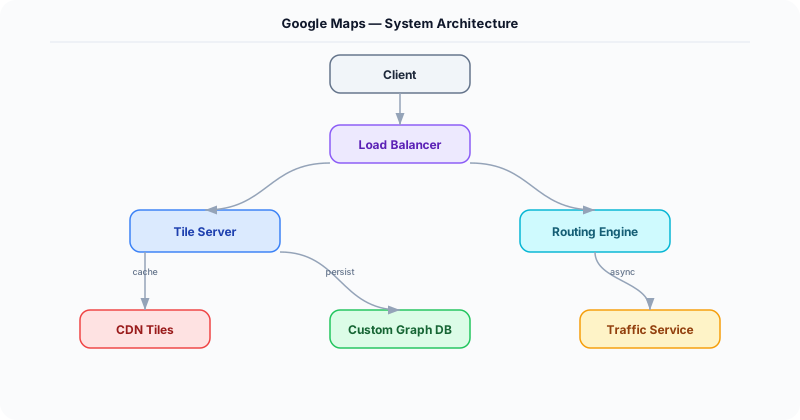
Tile Server -- Pre-renders the world map as a pyramid of tiles at each zoom level. At zoom 0: 1 tile covers the earth. At zoom 18: 68B tiles at ~1m resolution. Vector tiles (Mapbox Vector Tile format) are preferred over raster: 10x smaller, style-able client-side, and resolution-independent. Tiles are stored in object storage and served via CDN with long cache TTLs (map data changes slowly).
-
Routing Engine -- Models the road network as a weighted directed graph (intersections = nodes, road segments = edges, weight = travel time). Uses Contraction Hierarchies for fast shortest-path queries: a preprocessing step creates shortcut edges between important nodes, reducing the runtime query to ~1ms (vs. seconds for raw Dijkstra on a billion-edge graph). Traffic-aware routing adjusts edge weights using real-time traffic data.
-
Geocoding Service -- Maps address strings to coordinates (and reverse). Uses an address parser + a spatial index of addresses. Forward geocoding: parse "123 Main St, SF" into structured components, look up in address database. Reverse geocoding: find the nearest address point to a coordinate. Backed by Elasticsearch with geo_point fields.
-
Traffic Data Pipeline -- Aggregates speed data from millions of GPS-enabled devices (phones, connected cars). Each device reports (lat, lng, speed, heading) every 30 seconds. A Flink streaming job maps each report to a road segment (map matching), computes average speed per segment per minute, and classifies congestion: green (>80% of speed limit), yellow (40-80%), red (<40%).
-
Navigation Service -- Provides turn-by-turn directions based on the computed route. Monitors the user's real-time location and detects deviation from the route (>50m off-path triggers re-routing). Pushes updated ETAs as traffic changes en route.
Database Choice
Object storage (S3/GCS) for pre-rendered map tiles (petabytes). Custom graph storage (adjacency list in memory-mapped files) for the road network -- the entire US road graph (~100M nodes, 200M edges) fits in ~40 GB of RAM. Elasticsearch for geocoding (address search). Redis for real-time traffic segment speeds (1M road segments * 8 bytes speed = 8 MB, trivially fits in memory). Cassandra for historical traffic data and GPS traces.
Key API Endpoints
GET /api/v1/tiles/\{z\}/\{x\}/\{y\}.mvt
  -> Returns: Vector tile (protocol buffer format) for zoom level z, tile coordinates (x, y)

GET /api/v1/route?origin=37.77,-122.42&dest=37.33,-121.89&mode=driving&traffic=true
  -> Returns: \{ route: \{ distance_km: 78, duration_min: 55, polyline: "encoded...", steps: [\{ instruction: "Turn right on I-280 S", distance_m: 5200 \}] \}, traffic_delay_min: 8 \}

GET /api/v1/geocode?address=1600+Amphitheatre+Pkwy
  -> Returns: \{ results: [\{ formatted: "1600 Amphitheatre Parkway, Mountain View, CA", lat: 37.4221, lng: -122.0841 \}] \}
Scaling Insight
Contraction Hierarchies is the algorithm that makes real-time routing possible at scale. Raw Dijkstra on a graph with 100M+ nodes takes seconds per query. Contraction Hierarchies preprocesses the graph offline (takes hours, runs weekly): iteratively removes less-important nodes and adds shortcut edges preserving shortest-path distances. The result is a query that examines only ~1000 nodes instead of millions, answering shortest-path queries in <1ms. Traffic-aware queries use a modified version that re-weights shortcut edges based on current traffic.
Key Tradeoffs
| Decision | Option A | Option B | Chosen |
|---|---|---|---|
| Tile format | Raster (PNG) | Vector (MVT/PBF) | Vector -- 10x smaller, styleable client-side, sharper at all zoom levels |
| Routing algorithm | Dijkstra/A* (simple) | Contraction Hierarchies (preprocessed) | CH -- 1000x faster queries, worth the preprocessing cost for web-scale service |
| Traffic data source | Fixed road sensors | Crowd-sourced GPS | Crowd-sourced -- covers far more roads, real-time, no infrastructure cost per sensor |
Practical Implementation for .NET Developers
In a .NET application, you would typically implement this pattern using the following approach:
ASP.NET Core setup: Create a service class that encapsulates the logic, register it with dependency injection, and inject it into your controllers or minimal API endpoints. The built-in DI container handles lifecycle management.
Entity Framework Core: For database interactions, EF Core provides the ORM layer. Use migrations for schema management and raw SQL for performance-critical queries. Consider Dapper for read-heavy paths where EF Core's overhead matters.
Azure integration: If deploying to Azure, leverage managed services — Azure Cache for Redis, Azure SQL, Azure Service Bus, Azure Cosmos DB. These eliminate operational overhead and provide built-in monitoring through Application Insights.
Testing: Use xUnit with Testcontainers for integration tests that spin up real databases in Docker. Mock external dependencies with NSubstitute. The WebApplicationFactory class lets you test your entire HTTP pipeline in-process.
Monitoring: Add Application Insights telemetry to track request latency, dependency calls, and custom metrics. Use structured logging with Serilog to make production debugging possible:
Log.Information("Processing order {OrderId} for {CustomerId}", orderId, customerId);

This gives you searchable, structured logs in Azure Monitor or Seq.
System-Specific Clarifying Questions
Before designing Google Maps, ask questions specific to THIS system:
- Who are the primary users? Understanding the user base shapes every technical decision — consumer apps have different requirements than enterprise B2B systems.
- What is the read-to-write ratio? This determines whether you optimize for fast reads (caching, denormalization) or fast writes (write-ahead logs, async processing).
- What is the geographic distribution? Users in one country vs. global users fundamentally changes your data replication and CDN strategy.
- What is the acceptable latency? Some features need sub-100ms responses, others can tolerate seconds. This determines your caching and architecture strategy.
- What is the consistency requirement? Some data (payments, inventory) needs strong consistency. Other data (social feeds, recommendations) can be eventually consistent.
Architecture Deep Dive
The architecture for Google Maps should be designed around the specific access patterns of the system. Do not apply generic templates — every system has unique hotspots, bottlenecks, and scaling challenges.
Write Path: How does data enter the system? Is it bursty (event-driven, flash sales) or steady (sensor data, logs)? Bursty writes need queuing and backpressure. Steady writes can go directly to the database.
Read Path: How is data consumed? Is it fan-out (one write, many reads like social feeds) or point lookups (one read for specific data like user profiles)? Fan-out reads benefit from pre-computation and caching. Point lookups benefit from efficient indexing.
Hot Spots: Where are the bottlenecks? For Google Maps, identify the component that will fail first under load and design mitigation strategies: caching, sharding, rate limiting, or async processing.