Design URL Shortener
System design interview solution for Design URL Shortener. Includes requirements, API design, data model, architecture, scaling strategy, and tradeoffs.
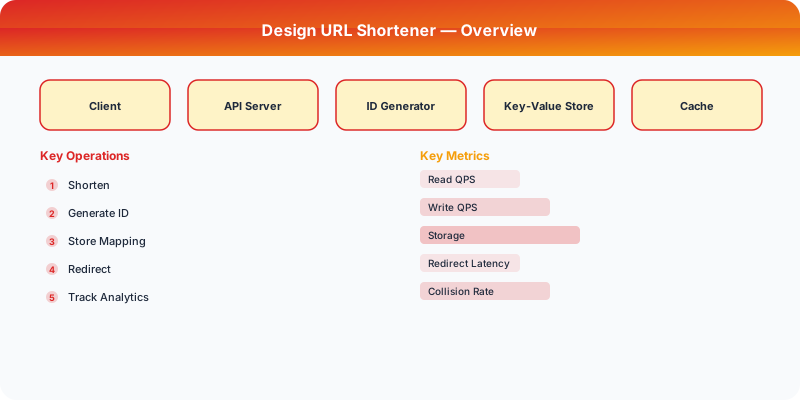
Problem Statement
Design a system similar to URL Shortener. The system should handle millions of users and provide a reliable, scalable experience.
Step 1: Clarifying Questions
Before diving into the design, ask these clarifying questions:
- What is the expected scale (users, requests per second)?
- What are the most critical features to support?
- What are the latency requirements?
- Do we need to support real-time features?
- What consistency guarantees are needed?
Step 2: Functional Requirements
- Core feature set for URL Shortener
- User-facing APIs and interactions
- Data storage and retrieval
- Search and discovery (if applicable)
- Notifications (if applicable)
Step 3: Non-Functional Requirements
- Scalability: Handle millions of concurrent users
- Availability: 99.99% uptime (four nines)
- Latency: Sub-200ms for read operations
- Consistency: Eventually consistent where acceptable, strongly consistent for critical paths
- Durability: No data loss
Step 4: Back-of-the-Envelope Estimation
| Metric | Estimate |
|---|---|
| Daily Active Users | 10M |
| Read:Write Ratio | 10:1 |
| Average Request Size | 1 KB |
| Storage per year | ~10 TB |
| Peak QPS | 100K |
Step 5: API Design
POST /api/v1/resource
GET  /api/v1/resource/{id}
PUT  /api/v1/resource/{id}
DELETE /api/v1/resource/{id}
Step 6: Data Model
Define the core entities and their relationships. Consider the access patterns when choosing between SQL and NoSQL.
Step 7: High-Level Architecture
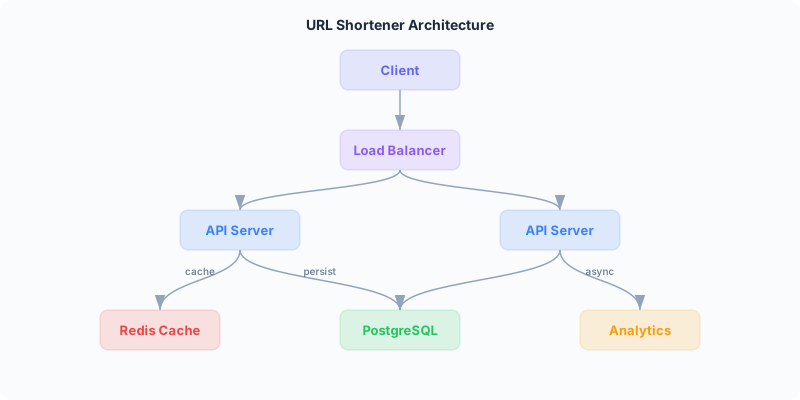
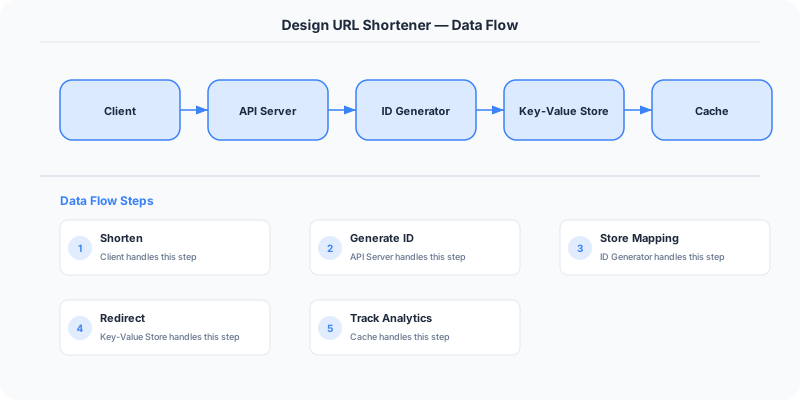
The system consists of these major components:
- Client Layer — Web/mobile clients
- API Gateway — Rate limiting, authentication, routing
- Application Servers — Business logic
- Database Layer — Primary storage
- Cache Layer — Redis/Memcached for hot data
- Message Queue — Async processing
Step 8: Detailed Component Design
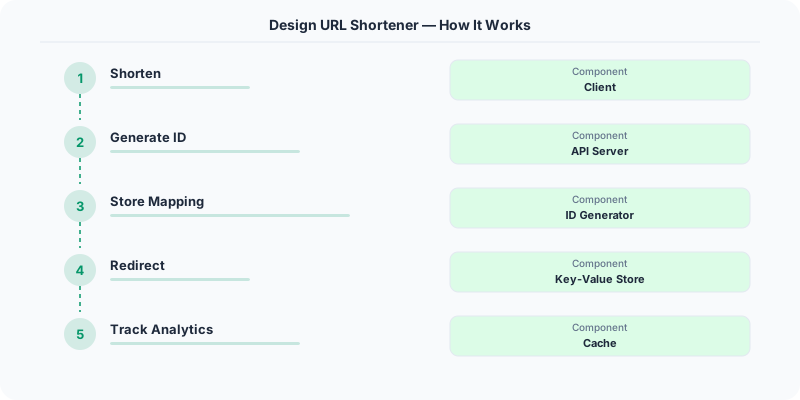
Write Path
How data flows from client to persistent storage.
Read Path
How data is retrieved, including cache interactions.
Step 9: Scaling Strategy
- Horizontal scaling of application servers behind a load balancer
- Database sharding by user ID or geographic region
- Read replicas for read-heavy workloads
- CDN for static content delivery
- Auto-scaling based on traffic patterns
Step 10: Reliability and Fault Tolerance
- Data replication across availability zones
- Circuit breakers for dependent services
- Graceful degradation under high load
- Health checks and automated failover
Step 11: Monitoring and Observability
- Request latency (p50, p95, p99)
- Error rates by endpoint
- Database query performance
- Cache hit/miss ratios
- Queue depth and processing lag
Key Tradeoffs
| Decision | Option A | Option B | Chosen |
|---|---|---|---|
| Database | SQL | NoSQL | Depends on access patterns |
| Consistency | Strong | Eventual | Eventual for most reads |
| Communication | Sync | Async | Async for non-critical paths |
How to Present This in an Interview
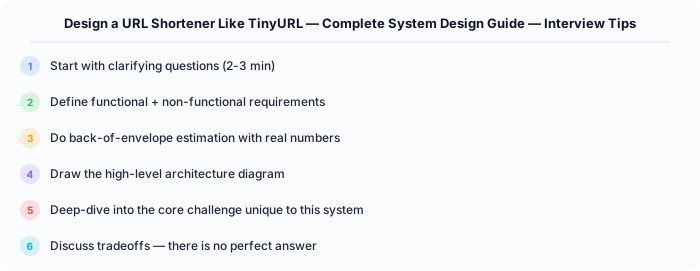
- Start with clarifying questions (2 min)
- Define requirements (3 min)
- Do estimation (2 min)
- Design API and data model (5 min)
- Draw high-level architecture (10 min)
- Deep dive into critical components (10 min)
- Discuss tradeoffs and bottlenecks (5 min)
Practical Implementation for .NET Developers
In a .NET application, you would typically implement this pattern using the following approach:
ASP.NET Core setup: Create a service class that encapsulates the logic, register it with dependency injection, and inject it into your controllers or minimal API endpoints. The built-in DI container handles lifecycle management.
Entity Framework Core: For database interactions, EF Core provides the ORM layer. Use migrations for schema management and raw SQL for performance-critical queries. Consider Dapper for read-heavy paths where EF Core's overhead matters.
Azure integration: If deploying to Azure, leverage managed services — Azure Cache for Redis, Azure SQL, Azure Service Bus, Azure Cosmos DB. These eliminate operational overhead and provide built-in monitoring through Application Insights.
Testing: Use xUnit with Testcontainers for integration tests that spin up real databases in Docker. Mock external dependencies with NSubstitute. The WebApplicationFactory class lets you test your entire HTTP pipeline in-process.
Monitoring: Add Application Insights telemetry to track request latency, dependency calls, and custom metrics. Use structured logging with Serilog to make production debugging possible:
Log.Information("Processing order {OrderId} for {CustomerId}", orderId, customerId);
This gives you searchable, structured logs in Azure Monitor or Seq.
Deep-Dive: Clarifying Questions for URL Shortener
Before designing, a senior candidate asks these SPECIFIC questions:
- What is the read-to-write ratio? URL shorteners are extremely read-heavy — typically 100:1 (for every URL created, it is redirected 100 times). This fundamentally shapes our architecture.
- How long should short URLs live? Permanent (like bit.ly links) or with a TTL (like temporary marketing campaign links)? Permanent means storage grows forever and we need to plan for that.
- Do we need custom aliases? Can users choose "mysite.co/summer-sale" or only get random short codes? Custom aliases require uniqueness checking against the entire key space.
- Do we need analytics? Click counts, geographic distribution, referrer tracking, time-series click data? Analytics significantly increases storage and compute requirements.
- What is the maximum URL length we accept? Most browsers support URLs up to 2,048 characters, but some systems allow longer. This affects our storage sizing.
- Should URLs be guessable? Sequential IDs (abc123, abc124) let attackers enumerate all URLs. Random 7-character base62 codes make enumeration impractical.
Specific Functional Requirements
- URL Shortening: Given a long URL, generate a unique short URL (e.g., short.ly/aB3xK9) that redirects to the original
- URL Redirection: When a user visits the short URL, redirect them to the original URL with HTTP 301 (permanent) or 302 (temporary) redirect
- Custom Aliases: Optionally allow users to specify a custom short code (e.g., short.ly/my-brand) with uniqueness validation
- Link Expiration: Support optional TTL — links can expire after a specified date
- Analytics Dashboard: Track click count, unique visitors, geographic distribution, and referrer for each short URL
- API Access: Provide a REST API for programmatic URL creation and analytics retrieval
Specific API Endpoints
POST /api/v1/urls
  Body: { "long_url": "https://example.com/very/long/path", "custom_alias": "my-link", "expires_at": "2025-12-31" }
  Response: { "short_url": "https://short.ly/aB3xK9", "long_url": "...", "created_at": "...", "expires_at": "..." }

GET /:short_code
  Response: HTTP 301 Redirect to long_url
  Headers: Location: https://example.com/very/long/path

GET /api/v1/urls/:short_code/stats
  Response: { "total_clicks": 15234, "unique_visitors": 8921, "clicks_by_country": {...}, "clicks_by_day": [...] }

DELETE /api/v1/urls/:short_code
  Response: HTTP 204 No Content
Specific Data Model
URLs Table (Primary Storage)
| Column | Type | Notes |
|---|---|---|
| short_code | VARCHAR(7) | Primary key, base62 encoded |
| long_url | VARCHAR(2048) | The original URL |
| user_id | BIGINT | Creator (nullable for anonymous) |
| created_at | TIMESTAMP | Creation time |
| expires_at | TIMESTAMP | Nullable, for TTL links |
| click_count | BIGINT | Denormalized counter for fast reads |
Click Events Table (Analytics)
| Column | Type | Notes |
|---|---|---|
| id | BIGINT | Auto-increment |
| short_code | VARCHAR(7) | Foreign key to URLs |
| clicked_at | TIMESTAMP | When the click happened |
| ip_address | VARCHAR(45) | For geo-lookup |
| user_agent | VARCHAR(512) | Browser/device info |
| referrer | VARCHAR(2048) | Where the click came from |
Use a NoSQL store (Cassandra or DynamoDB) for click events due to the write-heavy, append-only nature. Use a relational database (PostgreSQL) for the URL mapping for strong consistency on reads.
Specific Back-of-the-Envelope Numbers
Traffic Estimates:
- 100M new URLs created per month (similar to bit.ly scale)
- Read:Write ratio of 100:1 means 10B redirections per month
- Writes: 100M / (30 days * 24 hours * 3600 seconds) = ~40 writes/second
- Reads: 40 * 100 = ~4,000 reads/second (average), peak at 3-5x = ~15,000 reads/second
Storage Estimates:
- Short code: 7 characters (base62 = 62^7 = 3.5 trillion possible URLs — enough for decades)
- Average URL mapping: 7 bytes (code) + 200 bytes (avg long URL) + 50 bytes (metadata) = ~257 bytes
- 100M new URLs/month * 12 months * 5 years = 6B URLs = 6B * 257 bytes = ~1.5 TB for URL mappings
- Click events: much larger, partitioned by time, older data moved to cold storage
Bandwidth:
- Each redirect: ~500 bytes (HTTP headers) = 4,000 * 500 = 2 MB/second (negligible)
Caching:
- 80/20 rule: 20% of URLs generate 80% of traffic
- Cache the top 20% of URLs: 6B * 0.2 * 257 bytes = ~300 GB (fits in a Redis cluster)
Sources
URL Shortener Interview Deep Dive
Interviewers use the URL shortener problem to test fundamentals, but the questions they ask go far deeper than most candidates expect. Here are the exact questions and the answers that demonstrate senior-level thinking.
"How do you generate unique short codes?" There are three main approaches, each with different tradeoffs. (1) Base62 encoding of an auto-incrementing counter: a centralized counter (or database sequence) generates sequential IDs, which you encode to base62 (a-z, A-Z, 0-9). Short code "aB3xK9" maps to a specific integer. Pros: guaranteed unique, compact, predictable length. Cons: the counter is a single point of failure and a bottleneck. (2) MD5/SHA256 hash of the URL, then take the first 7 characters: distributed and stateless, but collisions are possible and must be handled. Bitly uses a variant of this approach. (3) Pre-generated key service: a background process pre-generates millions of unique short codes and stores them in a key pool. When a new URL is shortened, the service grabs the next available key. This eliminates collision checking at write time and is the most scalable approach for high write volumes.
"How do you handle collisions?" For hash-based generation, collisions are inevitable. When a collision is detected (the generated short code already exists in the database), append a retry counter or salt to the input and rehash. Use an exponential backoff or a maximum retry limit. Alternatively, switch to the pre-generated key approach where collisions are impossible by design because each key is only used once. For the counter-based approach, collisions do not occur because each counter value is unique — but you must handle the case where two instances try to use the same counter value concurrently, typically solved with a distributed lock or partitioned counter ranges (each server owns a range of counter values).
"How would you scale to 1 billion URLs?" 1 billion URLs at roughly 300 bytes each is about 300 GB — this fits on a single database server with a good SSD. The challenge is not storage but read throughput. With a 100:1 read-to-write ratio, 1 billion URLs could mean 100 billion redirects, or roughly 3,000 reads per second on average. This is manageable with a single PostgreSQL instance and a Redis cache. But at peak, you might see 30,000+ reads per second. The scaling strategy: (1) Put a Redis cluster in front of the database caching the most popular URLs — the top 20% of URLs serve 80% of traffic. (2) Use database read replicas for cache misses. (3) Shard the database by short code using consistent hashing if a single instance cannot handle the write load. (4) Use a CDN to cache redirects for extremely popular URLs at the edge. Companies like Bitly handle 600 million clicks per month using this layered caching strategy.
"What happens if the database goes down?" This tests your understanding of availability and fault tolerance. Answer in layers: (1) The Redis cache continues serving redirects for cached URLs — depending on your cache hit ratio (typically 80-90%), most users will not notice. (2) For writes, you queue new URL creation requests in a message queue (Kafka or SQS) and process them when the database recovers. Return a "URL will be available shortly" response or a 503 with retry-after header. (3) For database durability, use synchronous replication to a standby instance that can be promoted to primary within seconds (PostgreSQL streaming replication with pg_auto_failover, or AWS RDS Multi-AZ). (4) If using DynamoDB or Cassandra, the database itself handles node failures — your data is replicated across multiple nodes and the system continues operating during single-node failures.
Common Mistakes in URL Shortener Design
These are the mistakes interviewers see repeatedly and the corrections that demonstrate depth.
Not considering the read-to-write ratio. URL shorteners are among the most read-heavy systems in existence. Bitly reports roughly 600 million link clicks per month versus about 6 million links created — a 100:1 ratio. Your architecture must optimize for reads above all else. This means aggressive caching (Redis cluster holding the top 20% of URLs), read replicas, and possibly a CDN for the most popular redirects. Candidates who focus on the write path and treat reads as an afterthought miss the fundamental characteristic of the problem.
Using auto-increment IDs as short codes. Sequential IDs like short.ly/1, short.ly/2, short.ly/3 are a security disaster: anyone can enumerate all URLs in your system by incrementing the ID. They also leak information about your traffic volume (if the latest URL is short.ly/50000000, you have created 50 million URLs). Use base62 encoding of the counter rather than the raw number, or better yet, use random short codes from a pre-generated pool.
Ignoring the cache layer. Without caching, every redirect hits the database. At 3,000+ reads per second, a single database server is under significant load. With a Redis cache and an 85% hit rate, only 450 reads per second reach the database — an 85% reduction. The cache key is the short code, the value is the long URL. Set a TTL based on URL popularity: popular URLs stay cached longer, rarely accessed URLs expire after an hour. Use cache-aside pattern: check cache first, on miss read from database and populate cache.
Not discussing analytics. Modern URL shorteners are as much analytics platforms as they are redirect services. Bitly's primary business model is analytics, not URL shortening. When you design the system, explain that each click generates an analytics event containing: short code, timestamp, IP address (for geolocation), user agent (for device and browser breakdown), and referrer (for traffic source analysis). These events are write-heavy and append-only, making them perfect for a time-series database (InfluxDB), event streaming platform (Kafka to S3 or BigQuery), or NoSQL store (Cassandra or DynamoDB). Separating the analytics write path from the redirect read path is critical — you never want analytics processing to slow down redirects.
Choosing the wrong redirect status code. HTTP 301 (Moved Permanently) tells browsers and search engines to cache the redirect and go directly to the long URL in future requests. This is faster for users but means you lose visibility into repeat clicks — your analytics undercount. HTTP 302 (Found / Temporary Redirect) tells browsers to check the short URL every time, which ensures every click is tracked but adds latency. Most URL shorteners use 302 for analytics accuracy, switching to 301 only for specific enterprise customers who prioritize performance over tracking. Discussing this tradeoff in an interview shows attention to real-world product requirements.
Frequently Asked Questions About URL Shortener Design
What is the optimal length for a short code? Seven characters using base62 encoding (a-z, A-Z, 0-9) gives you 62^7 = approximately 3.5 trillion possible codes. At 100 million new URLs per year, this lasts over 35,000 years before exhaustion. Six characters gives 56 billion possibilities — still plenty for most use cases but might run low at extreme scale over decades. Shorter codes are better for usability (easier to type, share, and fit in SMS messages), but longer codes reduce collision probability when using hash-based generation. Bitly uses 7 characters, TinyURL uses 7-8, and Twitter's t.co uses 10 characters (they use a larger character set).
Should you use SQL or NoSQL for the URL mapping table? Both work well, but they optimize for different things. A relational database like PostgreSQL gives you ACID transactions (important if you need to guarantee that a short code is not double-assigned), mature tooling, and strong consistency on reads. It handles the URL shortener workload well up to tens of millions of URLs. A NoSQL key-value store like DynamoDB gives you automatic horizontal scaling, single-digit millisecond reads at any scale, and a natural fit for the access pattern (key-value lookup by short code). At Bitly's scale (billions of URLs), a distributed key-value store is the better fit. For an interview, start with PostgreSQL and explain when you would migrate to DynamoDB.
How do you handle URL expiration and cleanup? Support optional TTL on URL creation (the user specifies an expiration date). Store the expiration timestamp in the URL record. For redirect requests, check if the URL has expired before redirecting — return 410 Gone if expired. For cleanup, run a background job that scans for expired URLs and removes them from the database and cache. Use a database index on expiration timestamp for efficient scanning. For cache entries, set the Redis TTL to match the URL expiration so expired URLs are automatically evicted. TinyURL keeps URLs forever by default; Bitly allows enterprise customers to set expiration policies.
How do you prevent abuse of a URL shortening service? URL shorteners are frequently abused for phishing, malware distribution, and spam. Protection strategies: (1) Rate limiting — restrict URL creation to N per minute per IP address or authenticated user. Use a token bucket algorithm in Redis. (2) URL scanning — check submitted URLs against Google Safe Browsing API or similar blocklists before creating the short URL. (3) CAPTCHA for anonymous creation — require human verification for unauthenticated requests. (4) Link preview pages — instead of directly redirecting, show an interstitial page with the destination URL so users can verify before proceeding. (5) Monitoring and reporting — track click patterns and flag URLs with suspicious activity (sudden spike from unusual geographies, high click rate immediately after creation).
How would you implement custom aliases (vanity URLs)? Custom aliases like short.ly/summer-sale require additional validation: check that the alias is not already taken (uniqueness constraint), validate character restrictions (alphanumeric, hyphens, minimum length), and reserve certain aliases (api, admin, health) to prevent conflicts with system routes. Store custom aliases in the same table as generated short codes — they are functionally identical. The main engineering challenge is that custom aliases can conflict with future randomly generated codes, so reserve the custom alias namespace separately or check both tables during generation. Bitly charges a premium for custom aliases and limits them to paid accounts, which also reduces abuse.